


You can add pixels, counters and your own HTML code to the pages of a flow: the pre-landing, the landing and the pages shown after the order. The codes are added per flow, so different flows can use different pixels.
Where to add codes
- Open Tools → Flows and click the flow name (or create a flow first — see How to connect to an offer).
- Scroll down and expand External systems analytics and codes.
- Click the button of the system you need.

Available systems: Facebook Pixel, Yandex Metrica, Custom code, VK Retargeting, [email protected] and Google Analytics.
Facebook Pixel
Enter the pixel ID, choose the pages and the events for each page. The window and the choice of events are described in detail in Facebook Pixel on AFF1 pages.
Google Analytics, Yandex Metrica, VK Retargeting, [email protected]
The windows of these systems work the same way:
- Enter the ID of your counter or pixel in the system (ID for Google Analytics and VK Retargeting, Counter for Yandex Metrica).
- In Activate pages … choose where the code should work: pre-landing, landing and/or the page shown after a successful order.
- Yandex Metrica only: tick Use Webvisor if you need session recordings.
- Click Create.
Your own code (Custom code)
Use Custom code for any system that is not on the list — another ad network’s pixel, a heatmap, a chat widget.
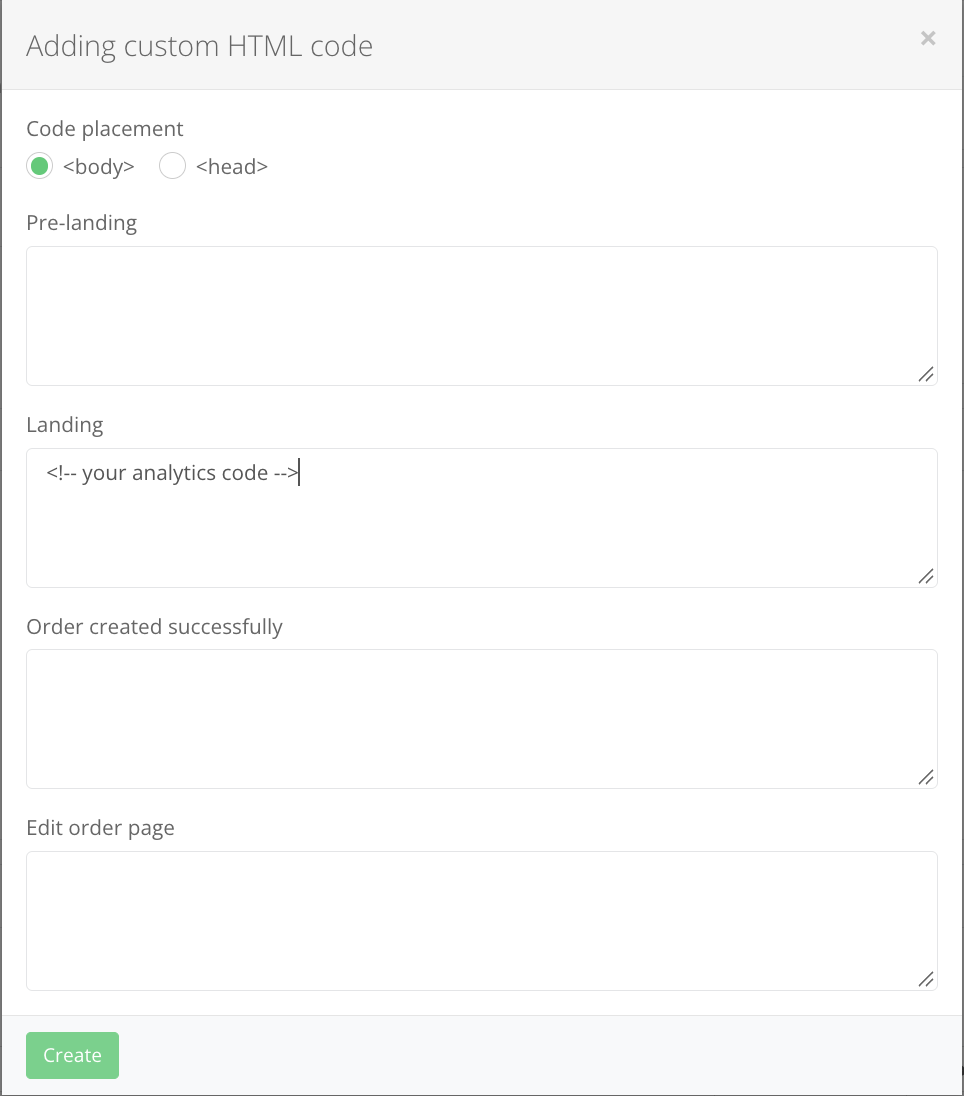
- Click Add Custom code.
- Code placement: choose
<body>or<head>— follow the instructions of the system whose code you add. Pixels and analytics tags usually go into<head>. - Paste the code into the fields of the pages where it should run:
- Pre-landing;
- Landing;
- Order created successfully — the page the visitor sees after placing an order. Put conversion events (Lead, Purchase) here;
- Edit order page — the page where the visitor can change the order data.
- Click Create.
Paste complete code snippets with their <script> tags. A broken tag can break the page layout or the order form and cost you leads. Check the pages after adding the code.
Check that the code works
- Open the flow link in a browser (preferably in a private window).
- Use the system’s tools: Meta Pixel Helper for Facebook, Tag Assistant for Google, the debug mode of Yandex Metrica.
- To check the code on the order page, place a test order only if your manager agreed to it — fake orders are counted as trash and spoil your statistics.